What is AI CRM? Ultimate Customer Relationship Guide (2026)

What an AI CRM actually is, how it differs from a traditional CRM, the five levels of 'AI' vendors mean, and how to evaluate one in an afternoon.
Direct answer: An AI CRM is a customer relationship management system where machine learning handles parts of the work a person used to do by hand — sorting leads, drafting messages, summarising calls and surfacing what to do next. The database underneath is the same as any CRM. What changes is how much of the admin around it runs without you.
That definition is deliberately narrow, because the term has been stretched to the point of meaning almost nothing. Nearly every CRM sold today calls itself an AI CRM. Most have added one feature. A few have genuinely changed how the product works. This guide is about telling those apart, what the technology actually does well, where it fails, and how to evaluate one without buying a demo.
What an AI CRM actually is
Strip away the marketing and a CRM is a database of people, the history of your interactions with them, and a set of reminders about what happens next. It has been that since the 1990s and it still is.
An AI CRM adds a model that reads that data and acts on it. In practice, that shows up in four ways:
- It writes things. Call scripts, follow-up messages, email drafts, summaries of what was said. This is the most common and the most mature use.
- It sorts things. Scoring or ranking leads so the list you work is ordered by something better than the order it was imported in.
- It extracts things. Turning a call recording or a messy note into structured fields — outcome, objection, next step — without anyone typing them.
- It suggests things. Surfacing which records have gone quiet, which deals look stalled, what to do this morning.
Notice what is not on that list: none of it talks to your customer for you, and none of it decides anything you would not want to review. That boundary is the difference between AI that survives contact with a real sales team and AI that gets switched off in week three.
The one-sentence version
An AI CRM automates the paperwork around the relationship, not the relationship. Any vendor promising the second thing is selling you a demo, not a product.
AI CRM vs traditional CRM: what actually differs
The underlying record structure is identical. The difference is entirely in who does the data entry and the prioritising.
| Task | Traditional CRM | AI CRM |
|---|---|---|
| Logging a call outcome | Rep types it, or does not | Drafted from the call, rep confirms |
| Deciding who to call first | List order, or a manual filter | Ranked by a model on past outcomes |
| Writing a follow-up | From scratch, or a rigid template | Drafted with the record's context |
| Spotting a stalled deal | A report someone remembers to run | Surfaced without being asked |
| Preparing for a call | Read the history yourself | Summary of the history |
| Data quality | Depends entirely on rep discipline | Better, but inherits whatever the model was given |
The last row is the one people underestimate. AI does not repair a CRM full of half-filled records — it produces confident summaries of them. Garbage in still applies, and it now arrives well-written. If you want more depth on the fundamentals, start with our complete CRM guide.
What "AI" usually means on a CRM pricing page
Vendors use the word to describe wildly different amounts of engineering. Here is a rough hierarchy, weakest first, so you can place any product you are shown.
- A text box wired to a language model. Useful, trivially built, and increasingly table stakes. This is what most "AI-powered" badges mean.
- Generation with your record's context. The draft knows who the contact is and what happened last time. A real step up, and the point at which it saves measurable time.
- Extraction into structured fields. Call or note becomes disposition, objection and next step. This is where data quality actually improves.
- Scoring trained on your outcomes. Not a generic industry model — one that learns from which of your leads closed. Rare, and only meaningful once you have enough history.
- Workflow that acts without prompting. Routing, re-queuing, escalation. Powerful and the easiest to get wrong.
Ask any vendor which of these five they do. The answer is usually one or two, and knowing which changes what you should pay.
Warning: "AI lead scoring" on a new account is often a generic model, not one trained on your business. Until you have a few hundred closed-won and closed-lost records of your own, a score is a guess with a decimal point. Ask what it was trained on.
Where AI genuinely helps, and where it does not
Being specific about the failure cases is more useful than another list of benefits.
| Use case | Verdict | Why |
|---|---|---|
| Drafting a first-call script | Strong | Beats a blank page; you edit it anyway |
| Summarising a long call | Strong | Saves the note nobody was going to write |
| Translating a follow-up message | Strong | Well-established capability |
| Ranking a warm inbound list | Useful | Recency and source signals are genuinely predictive |
| Scoring cold leads on a new account | Weak | No outcome history to learn from yet |
| Forecasting revenue | Weak | Small pipelines are too noisy for the model to beat a manager |
| Autonomous outreach with no review | Avoid | Reputational and regulatory exposure with no upside you cannot get safely |
Three examples of what this looks like in practice
Abstract capability lists are hard to evaluate. These are the concrete shapes the technology takes in a working day.
A solo agent working portal leads
Leads arrive from a property portal at unpredictable hours. The AI's job here is small and valuable: draft the opening message in the right language, and summarise what was agreed so the follow-up three days later is not reconstructed from memory. Scoring is pointless at this volume — the agent can hold the whole list in their head.
A five-person insurance team
Now there is enough volume that ordering matters and enough shared work that notes have to be legible to someone else. Extraction earns its keep: outcomes captured consistently across five people is what makes the weekly number mean anything. Script generation helps new joiners more than veterans.
A twenty-seat outbound floor
Here scoring finally has data behind it, and call summarisation becomes a coaching tool rather than a note-taking one. This is also the first point at which autonomous workflow — routing and re-queueing — is worth the risk, because there is someone whose job includes noticing when it misbehaves.
AI CRM on a phone: the Android case
Most CRM software still assumes a desk. For field sales — real estate, insurance, solar, direct sales — that assumption is the product's biggest flaw, and it is the reason CRM adoption fails in those teams far more often than any missing feature.
A phone-first AI CRM changes which features matter. Script generation is more useful standing outside a building than sitting at a desk. Call summarisation matters more when typing is hardest. And offline capture stops being a nice-to-have, because field coverage is genuinely unreliable.
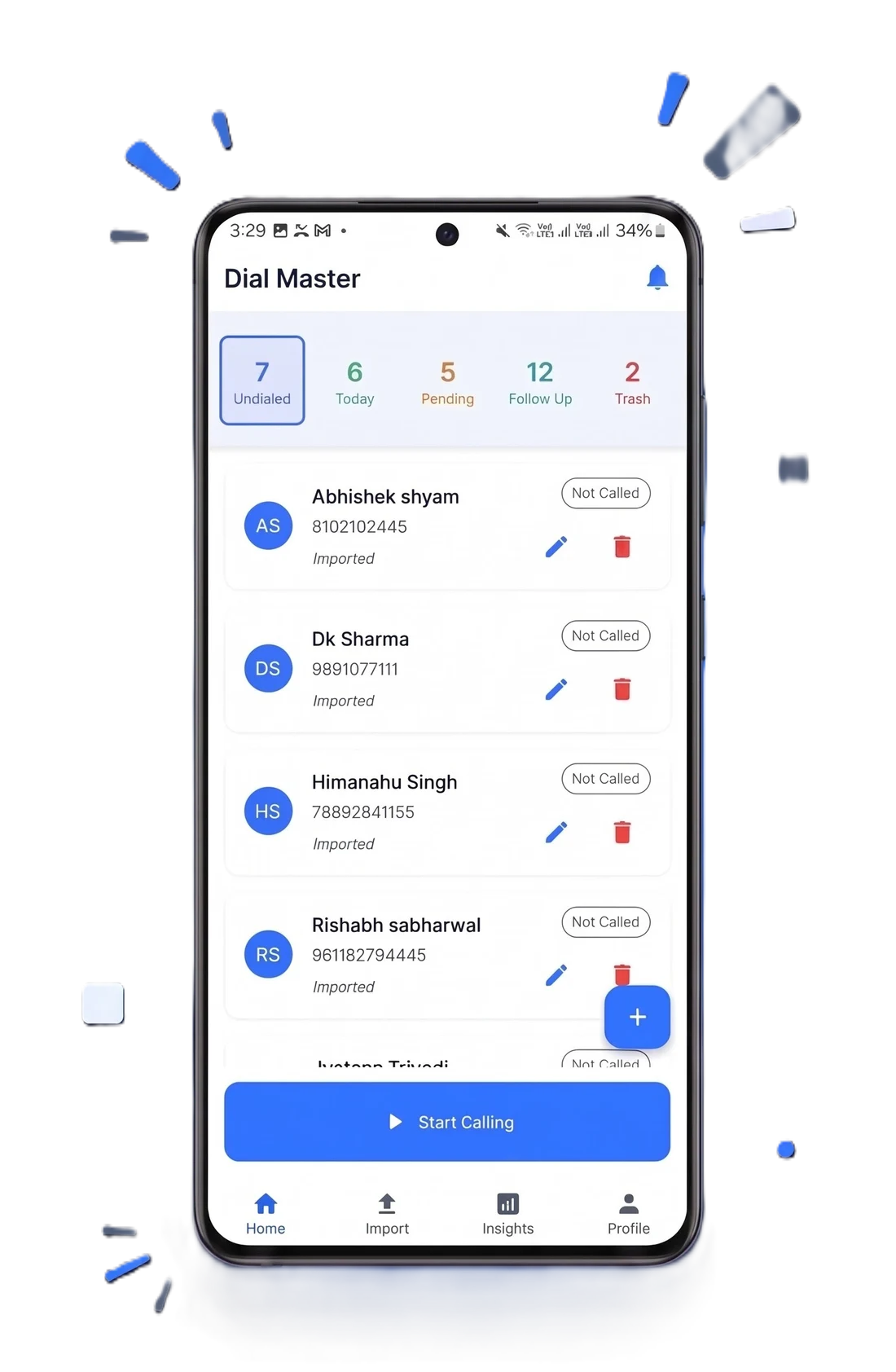
See the Android AI CRM comparison for how the available options differ, and our AI CRM overview for what we build.
What you hand over when you turn AI on
This is the part vendors discuss least and it is the part that should decide your shortlist. Every AI feature involves sending something somewhere — a call transcript, a contact record, a note — and processing it with a model.
- What leaves the device or your tenancy? Full records, or just the text of one field? The answer varies enormously.
- Is your data used for training? Ask for it in writing. A written no is worth more than a marketing page.
- Which sub-processors are involved? Every model provider in the chain is a party that touches your data.
- How long is anything retained? Look for a stated window in days.
UK and EU teams have a further obligation here: automated processing of personal data engages data protection law, and the regulator has published guidance specifically on AI. Start with the ICO's AI and data protection guidance. For a structured way to think about the risks, the US standards body publishes the NIST AI Risk Management Framework, which is free and vendor-neutral. Our own architecture position is set out in the zero data retention guide and on the data safety page.
How to evaluate an AI CRM in one afternoon
- Bring your own data. Import fifty real leads, not the demo dataset. Vendor demo data is curated to make the model look good.
- Ask which of the five AI levels it does. Text box, contextual generation, extraction, trained scoring, autonomous workflow. Make them pick.
- Test the extraction on a messy note. Not a clean one. Messy is what your CRM will actually contain.
- Read one generated message as the recipient. If you would not send it unedited, the time saving is smaller than advertised.
- Turn the AI off and use the CRM. If the product is unusable without it, you are buying a demo. The database has to be good on its own.
- Run a full export. Before you commit, not when you leave.
- Get the data questions answered in writing. Training, retention, sub-processors.
Pro tip: step five separates the field faster than anything else on the list. A good AI CRM is a good CRM with AI on top. A bad one is an AI feature with a database bolted underneath, and the difference only shows up after migration.
What an AI CRM costs
Pricing in this category is moving quickly and in one direction: AI features that were premium add-ons two years ago are now bundled, because bundling them is cheaper than explaining them.
- Bundled into the seat. Increasingly the norm, and the easiest to budget.
- A separate AI add-on per user. Common on established platforms retrofitting AI onto an older product.
- Credit or usage based. Hardest to forecast; ask what happens when credits run out mid-month.
DialMaster's free Starter plan includes the AI features rather than metering them separately, and the paid plans are in development with pricing published on the pricing page before launch. See also free AI CRM options for freelancers.
The short version
An AI CRM is a CRM where the admin runs itself: notes get written, lists get ordered, drafts get started. The database underneath is unchanged, which is why a weak CRM with strong AI is still a weak CRM.
Evaluate it on the boring things — import, export, offline behaviour, what happens when you turn the AI off — and on the data questions, in writing. The AI is the easiest part to demo and the least likely to be why the tool succeeds or fails for your team.
The vocabulary, decoded
Most confusion in this category is vocabulary rather than technology. Six terms cover almost everything you will be shown.
| Term | What it means here | Worth paying for? |
|---|---|---|
| Large language model (LLM) | The engine behind anything that writes or summarises text | It is the substrate, not a feature |
| Retrieval (often "RAG") | Feeding your records into the model so the output knows your context | Yes — this is the gap between generic and useful |
| Lead scoring | A ranking model over your pipeline | Only once trained on your own outcomes |
| Sentiment analysis | Labelling a call or message as positive or negative | Rarely — the label is coarse and reps already know |
| Conversation intelligence | Transcription plus analysis of recorded calls | Genuinely useful for coaching at ten-plus reps |
| Agent / agentic workflow | The system taking multi-step actions without prompting | Powerful, highest risk, needs an owner |
If a vendor cannot explain which of these six their feature is, that is itself informative.
How CRMs ended up with AI in the first place
This is worth a paragraph because it explains why so many implementations are shallow. CRMs spent thirty years accumulating a structural problem: they only work if salespeople enter data, and salespeople reasonably prefer selling to typing. Every generation of the software tried to fix this — simpler forms, mobile apps, gamification, mandatory fields. None worked, because the incentive was never there.
Language models were the first technology that could plausibly remove the typing rather than encourage it. That is the real reason AI arrived in CRM so fast: it addresses the category's oldest failure, not because it was a strategy but because it happened to fit. It also explains the shallowness — a vendor can bolt a text box onto a thirty-year-old product and legitimately call it AI, without touching the part that was broken.
The question that separates real from cosmetic
Does the AI reduce what a rep has to type, or does it add another box for them to fill in? The first fixes the category's original problem. The second is a feature announcement.
Rolling it out without it being switched off
Most AI CRM disappointment is an adoption failure, not a technology failure. These are the four ways it goes wrong, in roughly the order they happen.
- Turning everything on at once. Reps get scores, summaries, drafts and suggestions in week one, trust none of it, and revert. Enable one feature, prove it, then add the next.
- Starting with scoring. It is the most impressive in a demo and the least reliable on a new account. Start with generation and extraction, which work immediately.
- Not telling anyone what it does with recordings. Reps find out that calls are transcribed from a colleague rather than from you. Announce it before you enable it.
- Leaving no owner. Automations and prompts drift. Someone has to own them, or they become undocumented behaviour after the first departure.
A cautious rollout also has a compliance dimension. In the EU, obligations under the EU AI Act depend on how a system is classified and used, and transparency duties apply well before anything is considered high risk. Establish which side of those lines you sit on before you scale a workflow, not after.
What this looks like by industry
Real estate
Portal leads arrive constantly and go cold fast, so the valuable AI is the part that shortens the gap to first contact and drafts the message in the right language. Scoring matters less than speed. See the real estate CRM guide.
Insurance
Long cycles and repeated follow-ups mean call summaries carry most of the value — the conversation from six weeks ago is the one you need and nobody wrote it down. Extraction into structured fields is what makes renewal cycles manageable. See the insurance solution.
Education and admissions
Highly seasonal, high volume, and heavily scripted. Generation helps most with variant scripts for different programmes; the risk is sounding automated to applicants who are talking to several institutions at once and comparing notes.
More: all solutions and choosing a CRM as a small business.
Next: what an auto dialer CRM is, lead management fundamentals, what to automate first, features, and the free plan.
Stop manually dialing. Start closing.
Install DialMaster on your Android device and dial your first list in under five minutes. Free forever, no credit card, no VoIP bill — and your leads never leave your phone.