7 Best AI CRM Apps for Android in 2026 (Ranked & Tested)

Seven AI CRM apps for Android compared on verified pricing, offline behaviour and built-in dialing — with a selection guide instead of a single winner.
Direct answer: most CRMs on Android are desktop products in a mobile wrapper — they need a connection, they have no dialer, and calling means bolting on a separate telephony subscription. Only a few are built phone-first. This page separates the two groups, gives the pricing each vendor actually publishes, and ends with a selection guide rather than a winner.
Disclosure and method. DialMaster is our product, so treat its placement here as our opinion rather than an independent verdict — we have set out the cases where the alternatives are the better buy so you can judge it. Competitor prices were read from each vendor's own pricing page on 6 August 2026 and linked below. Where a vendor does not publish a figure, this page says so instead of repeating one from an aggregator.
What separates an AI CRM from a CRM with an AI button
Nearly every CRM now advertises AI. The useful distinction is what the AI removes from the rep's day.
- Generation. Call scripts, follow-up messages, objection handlers drafted with the record's context. Mature and immediately useful.
- Extraction. Turning a call or a scrappy note into structured fields. This is what actually improves data quality.
- Scoring. Ranking the list. Only meaningful once trained on your own closed-won and closed-lost history.
- Suggestion. Surfacing stalled deals and next actions without being asked.
A fuller breakdown is in what an AI CRM is. On Android specifically, one more axis matters more than any of them: whether the app works when the connection does not.
The Android question nobody asks in a demo
Field reps lose coverage constantly — basements, lifts, rural roads, client sites. A CRM that is a responsive web view stops working in those moments, which is precisely when a rep has time to update it. This single behaviour predicts CRM adoption in field teams better than any feature list.
The second Android-specific issue is battery management. Several popular Indian-market OEM skins terminate background services aggressively; Google documents the constraint in the Android developer guidance. An app that depends on a persistent background service will fail silently on those handsets.
Published pricing, verified
| App | Free tier | Paid, as published |
|---|---|---|
| DialMaster | Yes, Starter at USD 0 | Growth and Small Team in development; pricing not yet published |
| Zoho CRM | Yes, up to 3 users | Standard INR 800, Professional INR 1,400, Enterprise INR 2,400, Ultimate INR 2,600 per user per month |
| HubSpot | Yes, free CRM up to 2 users | Sales Hub Professional USD 90 per seat annual, USD 100 monthly; Enterprise USD 150 annual |
| Freshsales | 21-day trial | Growth USD 9, Pro USD 39, Enterprise USD 59 per user per month billed annually |
| Pipedrive | No | Not verified for this update — check the vendor page |
| Bigin by Zoho | Yes, single user | Not verified for this update — check the vendor page |
| LeadSquared | No | Not published |
Sources: Zoho CRM pricing, HubSpot Sales Hub pricing, Freshsales pricing. HubSpot's Starter tier is priced differently across billing periods and is best read on their page directly.
The seven, and who each is actually for
1. DialMaster — phone-first, with the dialer built in
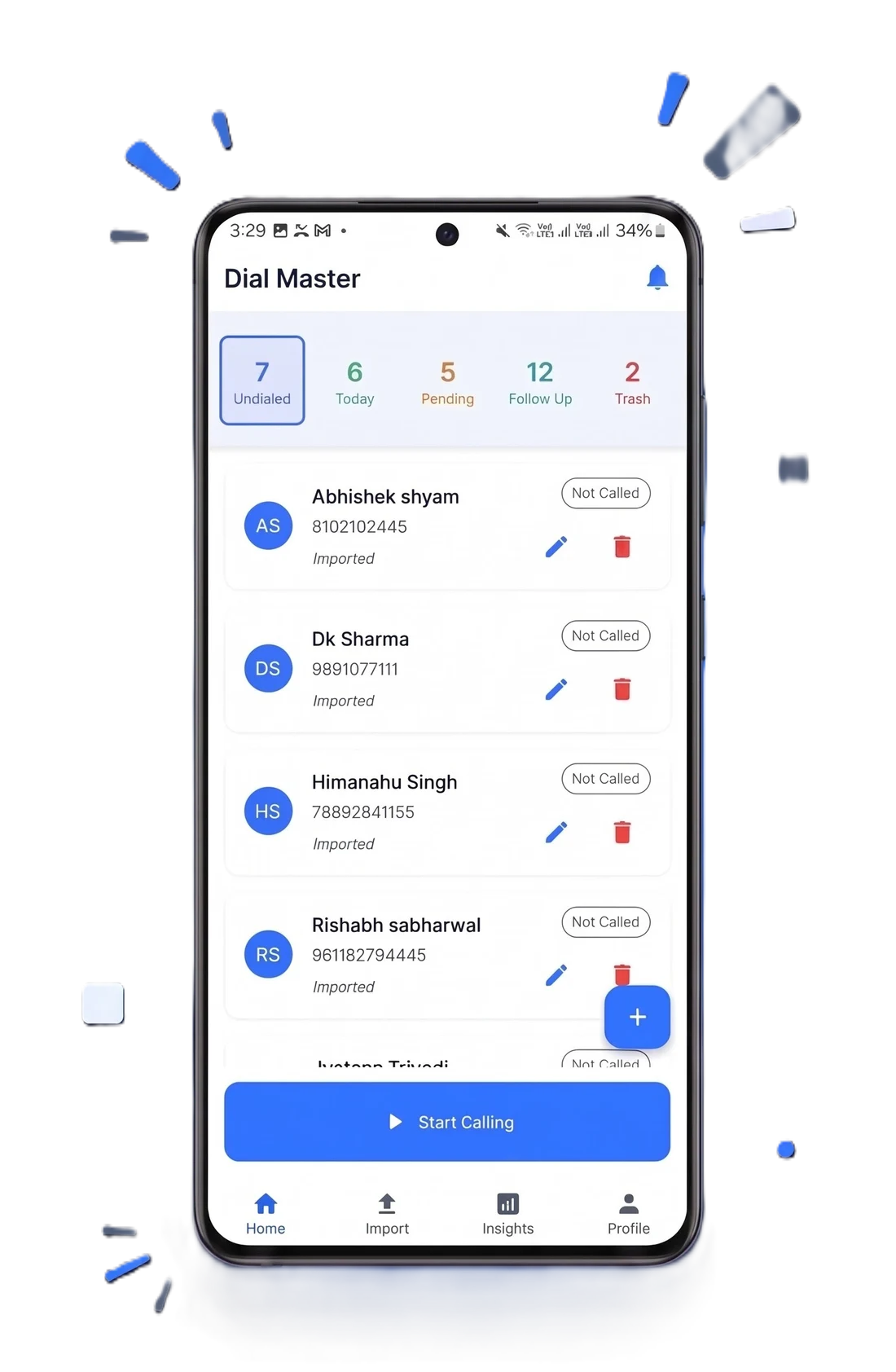
Built Android-first rather than adapted from a desktop product. The pipeline, the dialer and outcome capture sit on one screen, calls run over the phone's own SIM so there is no per-minute telephony line, and the app functions without a data connection.
Strengths: genuinely free tier with uncapped dialing, AI script generation, works offline, no VoIP bill, webhook lead intake. Limits: Android only, sequential dialing rather than multi-line, no inbound queue or IVR, and paid tiers are not yet priced. Best for field sales, solo agents and small teams whose constraint is dials attempted.
2. HubSpot — strongest for inbound and marketing alignment
Mature AI across content and scoring, and the free CRM tier is genuinely useful for up to two users. The Android app is a companion to the web product rather than a standalone tool, and there is no native dialer — outbound calling means adding a telephony integration.
Best for inbound-led teams where marketing and sales share a database.
3. Zoho CRM — the deepest ecosystem in India
Zia handles predictions, sentiment and anomaly detection, and the surrounding suite covers finance, support and analytics. Pricing is transparent and low relative to Western equivalents. The trade-off is a real learning curve, and the dialer depends on a third-party telephony provider through PhoneBridge.
Best for Indian businesses that want one vendor across several departments.
4. Freshsales — clean interface, strong scoring
Freddy AI covers lead scoring, deal insights and next-best-action, and the mobile app is among the fastest here. Outbound calling routes through Freshcaller with its own charges, and there is no permanent free tier — the entry point is a 21-day trial.
Best for mid-market inside sales teams that want scoring without enterprise weight.
5. Pipedrive — the clearest pipeline view
The Kanban deal board remains the most legible pipeline interface on a phone, and the AI assistant surfaces deal risk sensibly. Calling is VoIP-based with per-minute costs that matter in India, and there is no free tier.
Best for deal-led B2B sales where stage visibility matters more than call volume.
6. Bigin by Zoho — the deliberately small option
Zoho CRM reduced to pipelines and contacts. Light, quick and appropriate for a freelancer who finds a full CRM oppressive. No meaningful AI and no dialer.
Best for solopreneurs who want structure without a project.
7. LeadSquared — built for high-volume Indian operations
Designed for large admissions and BFSI teams handling very large lead volumes, with automated distribution and integrations into Indian telephony providers. Priced and scoped for that; disproportionate for a small team.
Best for EdTech admissions and BFSI call centres.
Feature comparison
| Capability | DialMaster | HubSpot | Zoho | Freshsales | Pipedrive |
|---|---|---|---|---|---|
| Permanent free tier | Yes | Yes, 2 users | Yes, 3 users | Trial only | No |
| Native dialer in the app | Yes, over your SIM | No, integration needed | Via PhoneBridge | Via Freshcaller | VoIP only |
| Per-minute telephony cost | None, uses your plan | Depends on integration | Depends on provider | Yes | Yes |
| Usable without a connection | Yes | No | Partial | No | Partial |
| AI script generation | Yes | Email-oriented | Via Zia | Via Freddy | Assistant, not scripts |
| Trained lead scoring | No | Yes | Yes | Yes | Partial |
| Inbound queue / IVR | No | Via integration | Via integration | Yes | Limited |
| Depth of third-party integrations | Webhooks | Extensive | Extensive | Good | Good |
Two rows carry most of the decision. If "usable without a connection" is a hard requirement, the field narrows immediately. If "trained lead scoring" is, it narrows in the opposite direction.
The honest summary
There is no best AI CRM for Android — there are two categories. Phone-first tools win when the constraint is calls made in the field. Desktop-first tools win when the constraint is pipeline complexity and integration depth. Pick the category first; the app is the easy part.
Selection guide
| If this describes you | Start with |
|---|---|
| Field agent, calling between appointments, patchy signal | A phone-first dialer with offline capture |
| Inbound leads from content and email, marketing shares the database | HubSpot |
| Indian SMB wanting finance, support and CRM from one vendor | Zoho |
| Inside sales team that wants scoring without enterprise overhead | Freshsales |
| Consultative B2B, few deals, long cycles | Pipedrive |
| Freelancer who has outgrown a spreadsheet and nothing more | Bigin |
| Admissions or BFSI, six-figure lead volumes | LeadSquared |
How to test any of them properly
- Install on the worst phone your team uses. Not the newest. Storage-constrained older Android is the real deployment target in most Indian teams.
- Import fifty of your own leads. Vendor demo data is arranged to make the product look good.
- Turn off mobile data and try to work. This single test eliminates most of the field in thirty seconds.
- Log ten real calls with outcomes. Count the taps. Multiply by your daily call volume — that number is the adoption question.
- Read one AI-generated message as the recipient. If you would not send it unedited, discount the time saving.
- Export everything before you commit. How hard that is tells you the real cost of leaving.
Warning: be sceptical of any ranking list — this one included — that does not disclose who owns the products it ranks or where its prices came from. Most "best CRM" listicles are affiliate placements, and the ordering follows the commission rather than the fit.
The verdict
If your constraint is getting through a call list from a phone, in the field, without adding a telephony bill, a phone-first tool with a built-in dialer is the right category, and a free tier means the test costs nothing but an afternoon. If your constraint is pipeline complexity, integration depth or trained scoring across a bigger team, HubSpot and Zoho are the stronger answers and it is not close.
Four claims to discount when you read the store listing
Play Store descriptions in this category share a set of phrases that sound like features and are not.
- "AI-powered." On its own this usually means a text box wired to a language model. Ask which specific job the AI does — writing, extracting, ranking or acting.
- "Works on mobile." Almost everything works on mobile. The question is whether it works without a connection, which is a different claim entirely and rarely made explicitly.
- "Unlimited calling." Check what carries the call. Unlimited minutes inside a VoIP plan is a real benefit; unlimited dialing over your own SIM means your existing plan carries it. Both are fine, but they are not the same product.
- "Free." Establish whether that is a permanent tier, a trial, or a free seat count. All three are advertised with the same word.
Getting your data in without losing the history
Whichever you choose, the import is where teams quietly lose the most valuable thing they own. Contacts are easy to move; outcome history is not, and it is the part that makes any scoring or reporting meaningful later.
- Export contacts and call history as separate files. They are usually separate exports and the second one is the one people forget.
- Import name and phone first. Get dialing working before rebuilding custom fields, or you will spend the afternoon on mapping and never place a call.
- Tag by source on the way in. A source tag at import is what turns next quarter's question into a filter rather than a rebuild.
- Map old dispositions deliberately. Old outcome codes rarely map one to one. Unmapped history becomes noise and takes your baseline with it.
- Keep the old system reachable for two weeks. Cutting over completely on day one is how teams discover what they forgot to export.
The same sequence applies whichever direction you move. See lead management fundamentals and connecting ad platform leads for what happens after the import.
Best practice: do the import during a trial, not after you sign. How painful it is into a product tells you roughly how painful it will be out of it later.
More: best CRM for Indian small business, free AI CRM for freelancers, best CRM for solopreneurs, what an auto dialer CRM is, our AI CRM, features, pricing, and the free plan.
Stop manually dialing. Start closing.
Install DialMaster on your Android device and dial your first list in under five minutes. Free forever, no credit card, no VoIP bill — and your leads never leave your phone.